SYNTH FIELD NODE / 4-LAYER BOARDKiCad 3D render · generated output
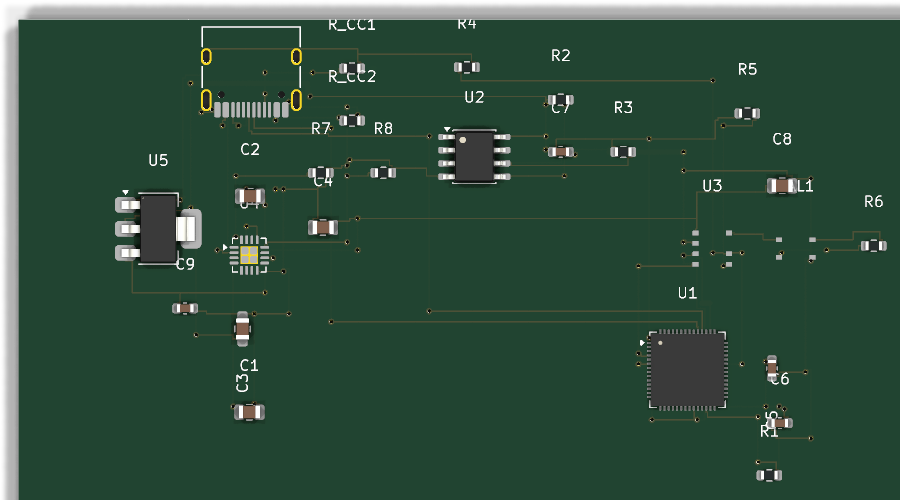 USB-C EDGE
 4 layers50Ω antenna pair1 secure element

Synth · AI-assisted PCB design
Describe your board. Your AI agent writes the circuit code; Synth checks it and generates KiCad schematics, layouts, and BOMs through a deterministic compiler workflow.
This Synth field node combines USB-C power and charging, an RP2350 controller, secure-element storage, cellular connectivity, RF matching, and explicit antenna keepouts.
USB-C EDGE
Follow the field node from its readable .synth source to
the PCB generated by Synth EE. Inspect the components, connections,
and constraints in the source, then open the board in KiCad to explore
the layout.
diff_pair u3_main_ant bal1_unbal
{ impedance 50ohm
                }
RF constraints stay attached to the design. A shared language for engineers and agents, backed by repeatable builds, explicit design rules, and changes you can inspect.
A typed compiler turns circuit source into KiCad schematics, boards, and BOMs. Deterministic placement and routing make results reproducible for the same source, parts, and settings.
Agents work as they do with other programming languages: write code, compile, read errors, fix the source, and recompile. Structured diagnostics identify source locations and provide suggested fixes where available.
Electrical-rule checks (ERC) flag circuit issues such as missing decoupling. Design-rule checks (DRC) inspect routed boards for clearance, trace-width, drill-size, and courtyard violations.
Components, connections, and constraints live in readable circuit source. Review the agent’s edits in Git, rerun the compiler and checks, and inspect generated outputs in KiCad.
If an agent invents a pin name, Synth’s resolver reports exactly where the design is wrong. The agent can fix the source and compile again using the same workflow it uses to write software.
The agent connects a controller to a secure element in circuit source.
Synth checks the connection against the component’s defined pins.
The agent replaces the invalid pin, then reruns compilation and checks.
component U1: mcu "rp2350"
component U2: secure_element "atecc608"
connect U1.gpo -> U2.sdaU1.gpo — part has no pin named gpo.
- connect U1.gpo -> U2.sda+ connect U1.gp0 -> U2.sdaBoth editions include the compiler and MCP agent tools. Choose Community for a workflow you run yourself, or Enterprise for a managed service and a custom agent harness.
CE Community Edition Build locally, connect your own AI agent, and keep circuit source in your repository. Extend the compiler and component registry to fit your work.
EE Enterprise Edition Bring Synth into your engineering organisation with a managed service, a custom agent harness, and support for your team’s design workflow.
Compare how a prompt becomes a design, how errors are checked, and what you can inspect and run yourself.
Build the Community Edition from the repository, then compile an example design or connect your AI agent. Start with a board brief: the agent can look up parts, write the circuit source, and use compiler feedback to refine it.
Follow the quick start →Run Synth’s Model Context Protocol (MCP) server and connect an MCP-compatible agent. It exposes the circuit language reference, part search, validation, fixes, placement, routing, and export. MCP is included in Community; use your own agent and model access.
Read the agent integration guide →Synth generates KiCad schematics, PCB layouts, and a bill of materials from .synth circuit source. Open the outputs in KiCad for inspection and downstream work. Keep design changes in the source so they are preserved when you regenerate the outputs.
Yes. Components, connections, and constraints are stored as readable circuit code. Review source changes in commits and pull requests, and run the compiler and validation commands in your CI pipeline. Pin the compiler, component registry, and settings for reproducible builds.
Community provides the open-source compiler, CLI, MCP agent tools, electrical and physical checks, and KiCad outputs to run yourself. Enterprise builds on that foundation with a managed service, a custom agent harness, and team support. Talk to us about your workflow and deployment requirements.
Discuss Synth Enterprise →Start with an example, connect your agent, and generate your first KiCad design. For a managed team workflow, talk to us about Enterprise.